
NCVT MIS ITI Result 2026 – Check 1st & 2nd Year Marks
The wait is almost over! NCVT ITI Result 2026 is scheduled to be released on 10 August 2026, according to the latest examination schedule issued by the Directorate General of Training (DGT). If you appeared in the 1st Year, 2nd Year, One-Year, or Six-Month CTS examination, you will be able to check your result online through the official Skill India Digital portal using your PRN Number and Date of Birth.
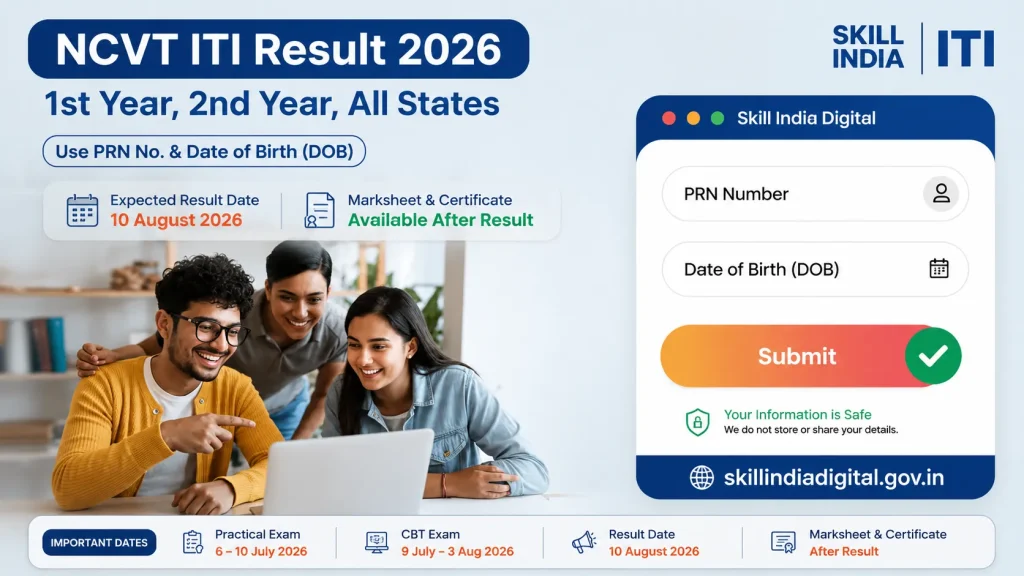
On this page, you’ll find the latest official updates, result date, marksheet download process, certificate verification, state-wise result links, and everything you need to know about the NCVT ITI Result 2026.
Live Update
NCVT ITI Result 2026 (Updated Table)
| Category | Information |
|---|---|
| Exam Conducting Authority | Directorate General of Training (DGT) |
| Examination Name | All India Trade Test under Craftsmen Training Scheme |
| Result Name | NCVT ITI Result 2026 |
| Practical Exam Schedule | 6 July to 10 July 2026 |
| CBT Exam Schedule | 9 July to 3 August 2026 |
| Result Announcement Date | 10 August 2026 |
| Result Status | Result Awaited |
| Applicable Courses | 1st Year, 2nd Year, One-Year and Six-Month CTS Courses |
| Required Login Details | PRN Number and Date of Birth |
| Official Result Portal | Skill India Digital Portal |
| Practical Hall Ticket | Available from 23 June to 10 July 2026 |
| CBT Hall Ticket | Available from 3 July to 3 August 2026 |
| Result Grievance Window | 17 August to 31 August 2026 |
| Marksheet and Certificate | Available after the official result publication |
How to Check ITI Result 2026 Online
Checking your ITI Result 2026 is quick and simple. The Directorate General of Training (DGT) has made results accessible online so students can view and download their marksheets from home. You don’t need to visit your ITI just a few details like your Roll Number or PRN and Date of Birth are enough which are availableon you ITI Admit card.
There are two official ways to check your result:
- Through the Skill India Digital (SIDH) portal
- Through the NCVT MIS official portal
Both methods show the same result, but the portals may look different. Here's how to use each one.
Method 1
Check ITI Result Through the Skill India (SIDH) Portal
- Open the Skill India portal and sign in with your login details.
- Go to the results section where you can view and download your ITI mark sheet easily.
Method 2
- Check ITI Result Through the Skill India (SIDH) Portal**
Open the Skill India portal and sign in with your login details. - Go to the results section where you can view and download your ITI mark sheet easily.
Method 1: Check via Skill India Digital Portal (SIDH)
You can easily access your ITI result through the official Skill India Digital Hub (SIDH) a government platform built to simplify result access and certification for ITI students.
Step-by-Step Guide:
- Open the Portal:
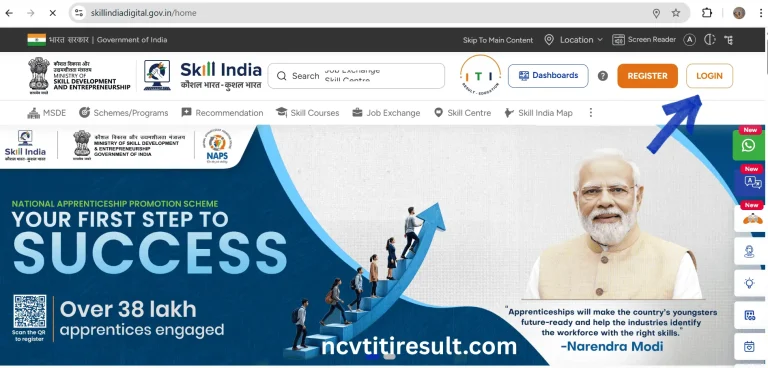
Visit skillindiadigital.gov.in in any browser on your phone or computer. - Login to Your Account:
Use your registered login details usually your username and password. New users may need to sign up first before proceeding.
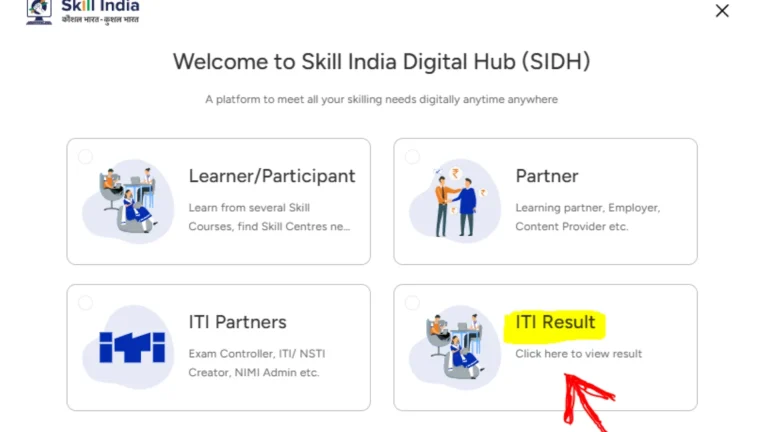
Select the ‘ITI Result’ Option:
After logging in, you’ll see several categories like Learner, Partner, etc. Click on the ‘ITI Result’ tab to continue.
Enter Required Details:
You’ll be asked to enter your PRN (Permanent Registration Number) or Roll Number, along with your Date of Birth.
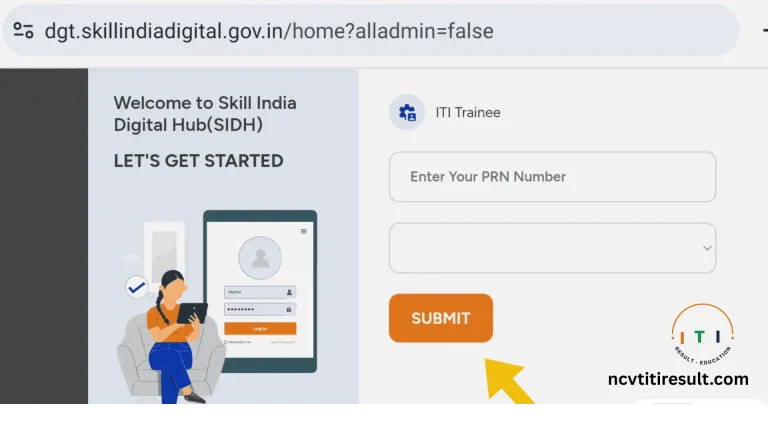
Submit and View Result:
After filling in the details, click Submit. Your result will appear on the screen along with your marksheet preview.
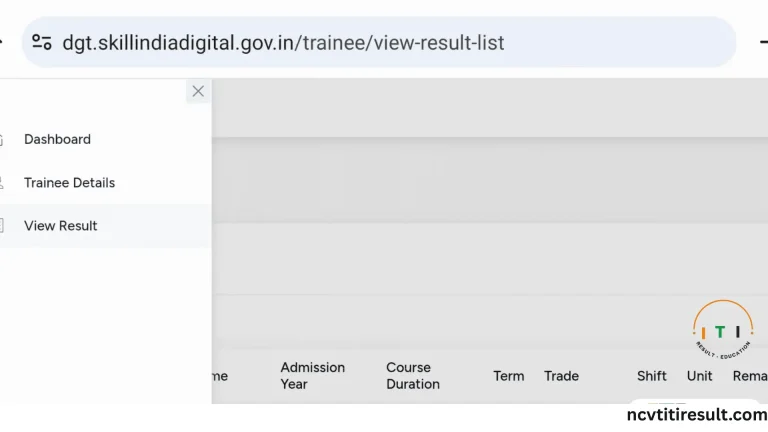
Download Marksheet and Certificate:
Click on the menu (usually in the top corner) to download your PDF marksheet and, if available, your digital certificate.

Pro Tip: Save a copy of your marksheet immediately. It may be needed for job applications, future training, or certificate verification.
Download Most latest iti books.
Method 2: Check ITI Result via NCVT MIS Portal
If you prefer using the traditional government portal, you can also view your ITI result through the NCVT MIS website. It’s official, secure, and widely used for result verification and certification tracking.
Step-by-Step Guide:
- Go to the NCVT MIS Portal:
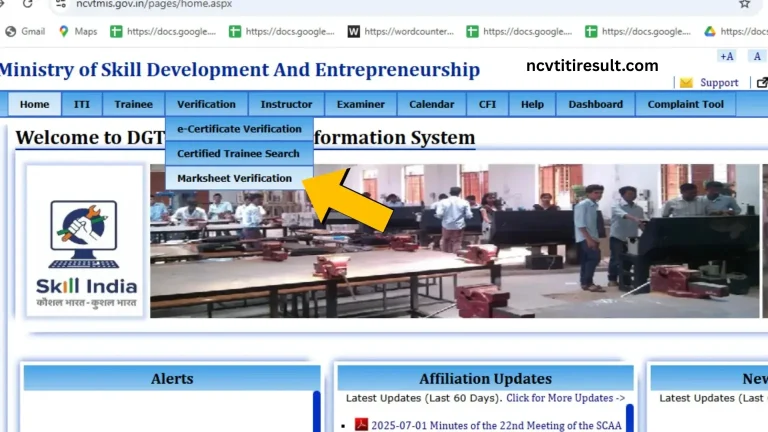
Open www.ncvtmis.gov.in in your browser. - Find Marksheet Verification:
On the homepage, look for the option that says “Marksheet Verification” and click on it.
- Fill in Your Details:
Enter your Roll Number or Registration Number along with your Date of Birth or any other required info.
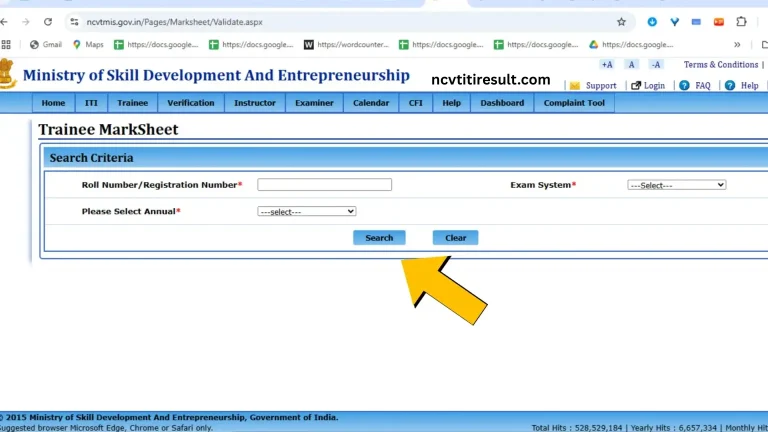
- Click Search:
Hit the Search button to process your request. - View Your Result:
Your result will appear on the screen, showing your subject-wise marks and pass/fail status.

Download Your Marksheet:
You can now download the marksheet directly as a PDF and keep it for your records.
Note on Server Downtime:
During peak times especially right after result release the Skill India and NCVT MIS portals may experience heavy traffic, causing slow loading or temporary downtime. If the website isn’t opening or your result isn’t loading, don’t panic. Just wait a few minutes and try again later. It’s a common issue when lakhs of students are checking results at the same time.
Details Mentioned on the ITI Marksheet
Your ITI Result 2026 marksheet includes the following important information:
- Candidate Name: Your full legal name as registered with NCVT
- Roll Number: Unique exam roll number assigned during CBT
- Father’s Name: As recorded in your training records
- Date of Birth: Your verified birth date used for ID and records
- Trade/Subject: Name of your ITI trade or vocational subject
- Examination Year: The session (e.g., 1st Year / 2nd Year - 2026)
- Subject-wise Marks: Separate marks for theory, practical, and other modules
- Total Score: Combined total of all subjects
- Grade/Percentage: Your final performance metric
- Result Status: Pass / Fail / Supplementary
- Certificate Eligibility: Whether you qualify for the NCVT certificate
- Exam Centre Info: Name and code of the center where you took the exam
- Official Seal & Signature: Authorized signature from the board
- Date of Issue: When the marksheet was officially released
How to Download the NCVT ITI Marksheet & Certificate?
Downloading your NCVT ITI Marksheet and Certificate is quick and easy. You can get both documents online by visiting the official NCVT portal. Make sure you have your Registration Number (PRN) or other required details before you begin.
- Go to the official NCVT MIS website.
- Find and open the Trainee or Certificate section.
- Enter your Registration Number (PRN), Date of Birth, and any other required information.
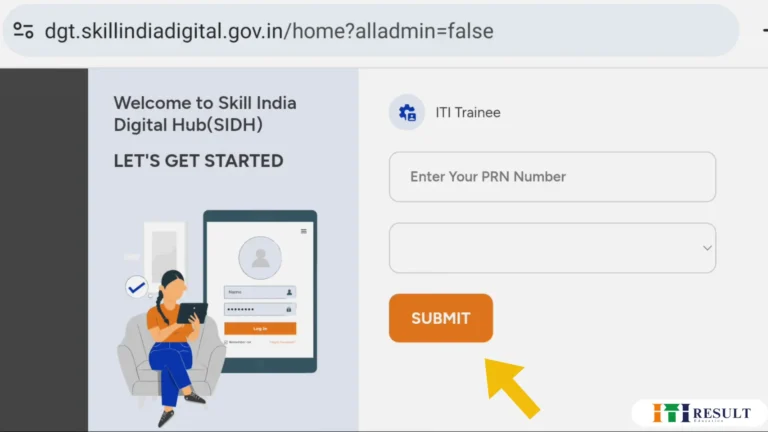
- Your trainee details will appear on the screen.
- Click on Download Marksheet to save your ITI marksheet as a PDF.
- To download your certificate, click Download Certificate or Print Certificate.
- Save the files to your device and print them if you need a hard copy.
- Tip: Always download your marksheet and certificate from the official NCVT portal to make sure the documents are genuine and up to date.
Check NCVT ITI Result For semester-wise
| NCVT ITI 1st Semester Result | Check Result |
| NCVT ITI 2nd Semester Result | Check Result |
| NCVT ITI 3rd Semester Result | Check Result |
| NCVT ITI 4th Semester Result | Check Result |
State-wise Result Check for 1st, 2nd, 3rd & 4th Semesters
NCVT also releases state-wise ITI results on its official website. You can access your state-wise ITI result from the list given below.
Here is the list of state-wise ITI Result
| Andhra Pradesh | Arunachal Pradesh |
| Assam | Bihar |
| Chhattisgarh | Goa |
| Gujarat | Haryana |
| Himachal Pradesh | Jammu And Kashmir |
| Jharkhand | Karnataka |
| Kerala | Madhya Pradesh |
| Maharashtra | Manipur |
| Meghalaya | Mizoram |
| Nagaland | Odisha |
| Punjab | Rajasthan |
| Sikkim | Tamil Nadu |
| Telangana | Tripura |
| Uttar Pradesh | Uttarakhand |
| West Bengal | Andaman And Nicobar |
| Chandigarh | Dadra And Nagar Haveli |
| Daman And Diu | Delhi |
| Lakshadweep | Pondicherry |
Common Errors While Checking ITI Result
| Error | Reason | Solution |
|---|---|---|
| Incorrect Registration Number | The registration number was entered incorrectly. | Check the number carefully and enter it again. |
| Wrong Date of Birth | The date of birth does not match the official records. | Enter your date of birth in the correct format. |
| Invalid Captcha | The captcha code was entered incorrectly. | Refresh the captcha and type the new code carefully. |
| Website Not Loading | Too many users are visiting the website at the same time. | Wait for a few minutes and try again later. |
| Result Not Available | The result has not been uploaded yet. | Check the website again after some time. |
| Slow Internet Connection | A weak internet connection interrupted the process. | Use a stable internet connection and reload the page. |
| Browser Issues | Browser cache or an outdated browser may cause errors. | Clear your browser cache or use the latest version of Chrome, Edge, or Firefox. |
| Server Error | The official website is temporarily unavailable. | Refresh the page or try again after some time. |
Technical vs. Non-Technical ITI Trades: What’s the Difference?
When you enroll in an ITI course, you’ll choose between technical (engineering) and non-technical (non-engineering) trades. Here's a simple breakdown of both categories along with popular examples.
Technical (Engineering) Trades
These trades focus on machines, tools, electronics, construction, and industrial work. Students learn hands-on skills for careers in mechanical, electrical, civil, and computer-related fields. Most courses last 2 years and require passing Class 10 with Science and Math.
Popular Technical Trades:
- Electrician
- Fitter
- Electronics Mechanic
- Draughtsman (Civil)
- Computer Hardware & Network Maintenance
- Mechanic (Motor Vehicle)
- Turner / Machinist
- Plumber
- Sheet Metal Worker
These are ideal for students aiming for jobs in factories, power plants, manufacturing units, and tech service roles.
Non-Technical (Non-Engineering) Trades
Non-technical trades focus more on service, administrative, creative, or hospitality skills. These courses often last 1 year and have flexible entry rules — some even accept students after 8th grade.
Popular Non-Technical Trades:
- Computer Operator and Programming Assistant (COPA)
- Stenographer & Secretarial Assistant (English or Hindi)
- Dress Making
- Desktop Publishing Operator
- Cosmetology
- Food Production (General)
- Front Office Assistant
- Computer Aided Embroidery & Designing
These trades suit students interested in office work, design, beauty, hospitality, or basic IT services.
Which Trade Should You Choose?
- Choose technical trades if you enjoy working with machines, tools, or systems — and want a job in manufacturing, engineering, or electrical fields.
- Go for non-technical trades if you prefer customer service, creative skills, admin work, or short-term, job-ready training.
NCVT: A Brief Overview
What is NCVT?
The National Council for Vocational Training (NCVT) is a government body under the Ministry of Skill Development and Entrepreneurship (MSDE). It oversees vocational education and training in India and is responsible for standardizing skill-based courses across all ITIs (Industrial Training Institutes).
Key Functions of NCVT
Setting Standards
NCVT designs the national curriculum for technical and non-technical trades, ensuring consistent training across all ITIs in India.
Conducting Examinations
It supervises the exam process for both 1st year and 2nd year ITI trainees, including practical and theory tests.
Certifying Students
Students who complete ITI training and pass exams receive a nationally recognized NCVT certificate, which is valid for jobs across India.
Accrediting Institutions
Only ITIs affiliated with NCVT can offer approved courses. NCVT conducts regular checks to maintain quality.
Offering Digital Access
Through the NCVT MIS portal, students can view results, download marksheets, and verify their certifications online.

NCVT ITI Certification
The NCVT certificate is more than just a result — it’s proof that a student has successfully completed skill training in a recognized trade. It plays a vital role in job applications, government recruitment, apprenticeships, and higher technical education.
How Does the ITI Training Center Work?
Understanding ITI and Its Importance
An ITI (Industrial Training Institute) is a technical training center that prepares students for real-world jobs through short-term courses. ITIs play a critical role in skill development, especially for students who want to enter the workforce quickly after high school.
How Does an ITI Training Center Operate?
ITI centers work under the affiliation of NCVT or State Councils (SCVT) or . They offer training programs in various trades like Electrician, Fitter, COPA, Dress Making, and more. Training includes both classroom instruction and hands-on practicals.
Variety of Courses and Specializations
Courses are divided into:
- Engineering Trades (technical, like electrician, mechanic)
- Non-Engineering Trades (service-based, like cosmetology, office assistant)
Each course has a set duration typically 1 or 2 years depending on the trade.
Admission Process
To get into an ITI, students typically need to:
- Have completed Class 8 or 10 (depending on the trade)
- Apply through state-level ITI portals or directly through the institute
Sit for merit-based selection or entrance exams (in some states)
Documents Required for Admission
Most ITIs will ask for the following:
- 10th mark sheet (or 8th, as required)
- Transfer certificate (TC)
- Birth certificate or Aadhaar card
- Caste or income certificate (if applicable)
- Passport-size photos
Classroom Learning and Practical Training
Each trade includes a mix of:
- Theory classes (trade knowledge, safety, calculations)
- Workshop training (hands-on practice using tools and machines)
Apprenticeship and Industry Exposure
After completing the course, many ITIs offer apprenticeship opportunities in industries. This gives students real-time experience and improves job placement chances.
Certification and Results
Once the exams are completed and results published via the NCVT MIS portal, successful students receive:
- A digital marksheet
- A national trade certificate
Both are proof of skill qualification.
Career Opportunities After ITI
ITI graduates can:
- Apply for jobs in the public sector (railways, PSUs, defense, etc.)
- Work in private industries based on their trade
- Start their own business or service (e.g., electrician, mechanic)
- Pursue an apprenticeship for more hands-on experience
- Move into higher technical education (e.g., polytechnic diploma)
Frequently Asked Questions (FAQs)
Conclusion
The release of the ITI Result 2026 marks an important step for thousands of students building their future through skill-based training. With fully digital access through the Skill India and NCVT MIS portals, getting your result and certificate is easier than ever.
Whether you're a 1st-year trainee planning for the next level or a 2nd-year student ready for job placements or apprenticeships, this result helps you move forward. Be sure to download and save your marksheet, double-check your details, and explore your next steps because your journey doesn’t end here, it’s just beginning.