
NCVT ITI Admit Card 2026 Download: CBT & Practical Hall Ticket
The NCVT ITI Admit Card 2026 is required to appear in the AITT Practical and CBT (Theory) exams. Without a valid admit card, you cannot enter the examination hall. It also contains important details like your exam date, time, centre, trade, roll number, and exam instructions.
If you’re looking for how to download the NCVT ITI Admit Card 2026, you’ve come to the right place. In this guide, you’ll learn the latest admit card release updates, the official download process, important dates, required documents, and solutions to common download problems. According to the latest DGT examination schedule, the July 2026 AITT exams will be conducted from 6 July to 3 August 2026, and admit cards are released through the official Skill India Digital (SIDH) portal before the exams.
NCVT ITI Admit Card 2026: Quick Overview
| Particular | Details |
|---|---|
| Admit Card Name | NCVT ITI Admit Card 2026 |
| Exam Name | All India Trade Test (AITT) 2026 |
| Conducting Authority | Directorate General of Training (DGT) |
| Exam Mode | Practical & CBT (Theory) |
| Practical Exam Dates | 6 July to 10 July 2026 |
| CBT Exam Dates | 9 July to 3 August 2026 |
| Admit Card Release | Before the examination |
| Download Portal | Skill India Digital (SIDH) Portal |
| Required Details | PRN/Registration Number and Date of Birth |
| Purpose of Admit Card | Entry to the examination hall and verification of candidate details |
| What You’ll Learn in This Guide | Admit card release date, download steps, required documents, common errors, and their solutions |
How to Download ITI Admit Card 2026
To check and download your NCVT ITI Admit Card 2026, there are two easy methods available for students. The first method is through the official NCVT MIS portal, which is the most popular and commonly used option. The second method is through the Skill India (SDMS/SID) portal, where trainees can also access their admit card. We will first explain the NCVT method in detail and then move on to the Skill India method.
Method 1: From NCVT MIS Portal
- Go to the official NCVT MIS website.
- On the homepage, you will see the “Trainee” option at the top.
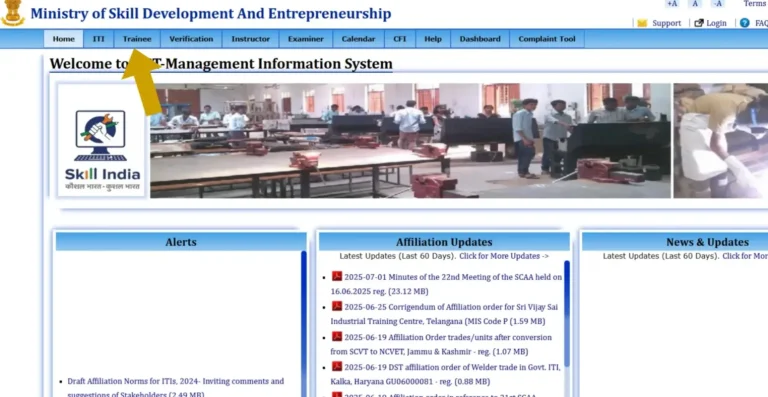
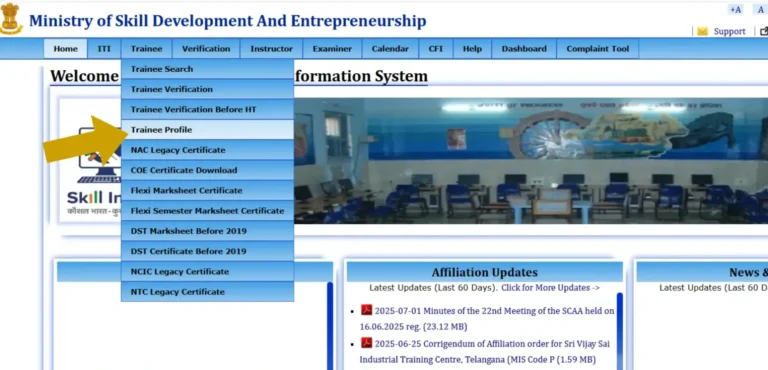
- Hover your mouse over the Trainee tab.
- A small drop-down menu will appear.
- Click on “Trainee Profile” from the list.
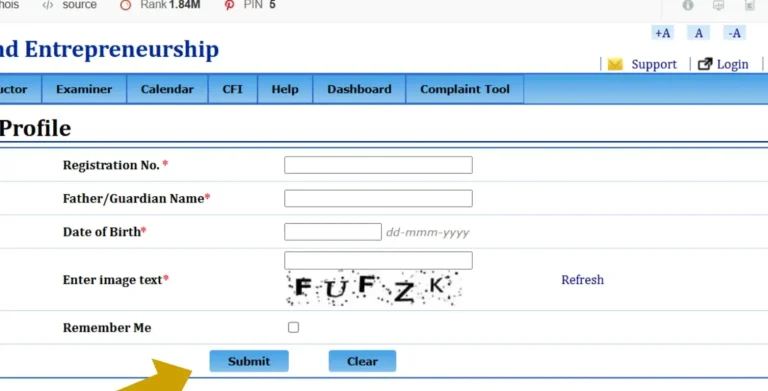
- A new page will open asking for your details:
- Fill in all the details correctly.
- After that, click on the Submit button.
- Your Trainee Profile will open on the screen.
- Here, you will find the Admit Card / Marksheet section.
- Click and download your NCVT ITI Admit Card 2026 easily.
Method 2: From Skill India (SIDH) Portal
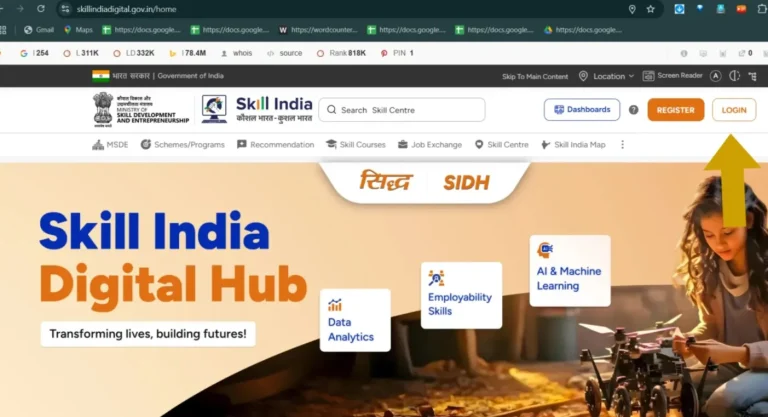
- Open the Skill India (SIDH) portal on your phone or computer.
- On the homepage, look for the Login button and click it.
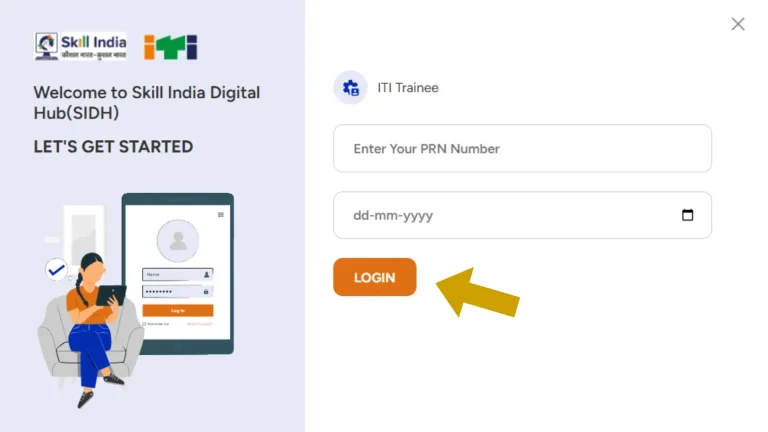
- Type in your PRN number and Date of Birth in the login fields.
- After entering your details, press the Login button to access your account.
- Once you log in, your trainee dashboard will appear on the screen.
- Tap the menu icon (☰) at the top-right corner to open more options.
- From the menu, choose the option related to your exam Practical or CBT, depending on which hall ticket you want.
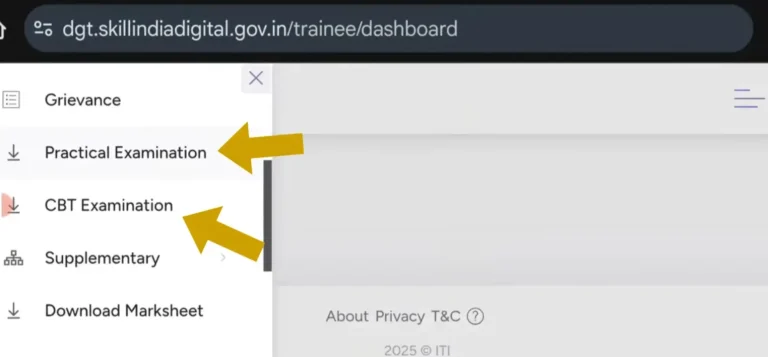
- Select the hall ticket you want to download.
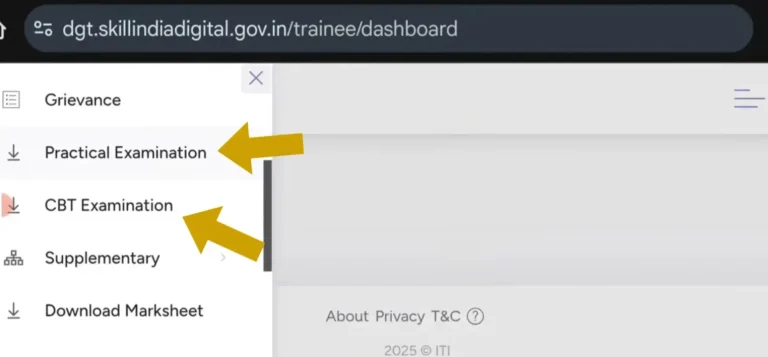
- The ITI Admit Card 2026 will instantly download to your device as a PDF file.
- You can now open it, save it, or take a printout whenever needed.

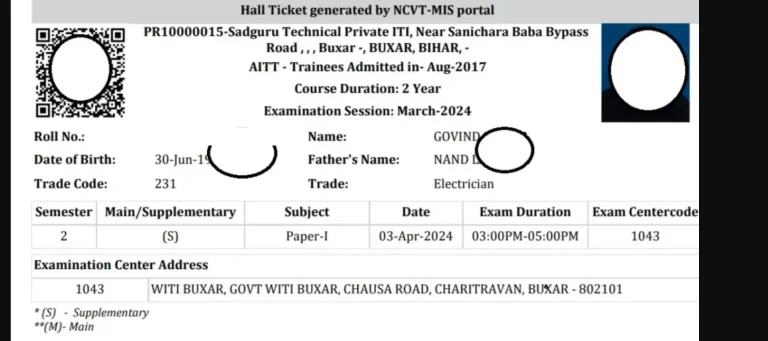
Details Mentioned on the ITI Admit Card 2026
Your NCVT ITI Admit Card 2026 contains important information that you must check carefully before the exam. Make sure every detail is correct because any mistake can create problems on exam day.
What You Will See on the Admit Card
- Student’s Full Name
- Father’s Name
- Registration Number / Roll Number
- Trade Name (Electrician, Fitter, etc.)
- ITI Name and State
- Exam Type (Practical or CBT)
- Exam Date and Shift Timing
- Exam Centre Name and Address
- Trainee Photo and Signature
- Instructor/Officer Signature
- Important Exam Instructions
Why This Information Matters
These details confirm your identity and show exactly when and where you have to appear for the exam. If anything looks wrong like name, trade, or photo you should contact your ITI immediately for correction.
State-Wise Official Websites for ITI Admit Card 2026
Important Instructions for ITI Admit Card 2026
- Carry a printed copy of your admit card to the exam centre. A digital PDF on mobile is not accepted.
- Make sure your photo, name, trade, and roll number are clearly visible on the admit card.
- Reach the exam centre at least 30 minutes early to avoid last-minute issues.
- Keep a valid ID proof with you (Aadhaar Card, ITI ID card, etc.) along with the admit card.
- Follow the exam date, shift, and centre address exactly as mentioned on the admit card.
- Do not write anything or make marks on your admit card.
- If there is any mistake in your details, contact your ITI institute immediately for correction.
- Keep 2–3 photocopies of your admit card as a backup.
- Mobile phones, smartwatches, calculators, earphones, or any electronic devices are strictly not allowed in the exam hall.
- Reach the exam centre only on the time mentioned for your Practical or CBT exam timings are different for each trade.
Common Issues While Downloading ITI Admit Card
1. Website Not Opening or Loading Slowly
Reason: Too many students are trying to download at the same time.
Solution: Try again after some time, preferably early morning or late night.
2. “No Data Found” or Admit Card Not Showing
Reason: Your admit card may not be released yet, or your details don’t match records.
Solution:
- Recheck your registration/roll number.
- Confirm your details from your ITI.
- Wait for the official release.
3. Wrong Details Entered
Reason: Students sometimes enter incorrect DOB or spelling mistakes.
Solution:
- Enter the exact details used during ITI enrollment.
- Check your trainee profile for correct information.
4. Forgot Registration Number or PRN Number
Reason: Students lose their admission details.
Solution:
- Ask your ITI institute to give your registration number/PRN again.
- Check your old mark sheet or admission slip.
5. Admit Card Showing Incorrect Information
Reason: Data mismatch during upload.
Solution:
- Take a screenshot and report immediately to your ITI.
- Do not go for the exam until corrected.
ITI Practical vs CBT Admit Card
Practical Admit Card
- This admit card is for your hands-on practical test.
- It includes your practical exam date, batch/shift, tools list, and the exam centre.
- Usually released earlier than the CBT admit card.
- You must carry it on the day of your workshop-based practical exam.
CBT Admit Card
- This is for your computer-based theory exam.
- Contains your exam date, shift time, computer lab centre, and seat number.
- Released after the practical admit card, usually closer to the exam date.
- Required for the theory exam that you will give on a computer.
ITI Exam Pattern 2026 (Practical + CBT)
Understanding the exam pattern helps you prepare better and avoid mistakes. The NCVT ITI exams are divided into two main parts:
1. Practical Exam Pattern
- This test checks your skills and hands-on ability.
- You perform tasks related to your trade (e.g., wiring, fitting, welding, software tasks).
- Marks are given based on accuracy, safety, time management, and quality of work.
- The duration depends on the trade usually 3 to 5 hours.
2. CBT (Computer-Based Test) Pattern
- This is your theory exam, taken on a computer.
- Includes multiple-choice questions (MCQs).
- Questions are based on your trade theory, workshop calculations, and employability skills.
- The total time is usually 1–2 hours, depending on the paper.
- Each question carries equal marks, and there is no negative marking in most trades.
Why Knowing the Pattern Helps
- You can plan your preparation better.
- You understand which area needs more focus practical or theory.
- It reduces stress on exam day because you know what to expect.
Frequently Asked Questions (FAQs)
Conclusion
The NCVT ITI Admit Card 2026 is an essential document for every ITI student appearing in the Practical or CBT exam. With two simple methods NCVT MIS and Skill India Portal downloading the admit card has become faster and easier for trainees. Make sure you check all details carefully, keep multiple printouts, and follow all exam instructions to avoid last-minute issues.
If you face any problems while downloading, don’t panic most issues can be fixed by rechecking your details, waiting a little while, or contacting your ITI. Stay prepared, stay confident, and give your best in the exam.
Good luck!